Free download: php-upgrade-check-1.0.0.zip (GPLv2). Install: WordPress admin → Plugins → Add New → Upload Plugin → choose the zip → Activate. Then open Tools → PHP Upgrade Check.
Why use it
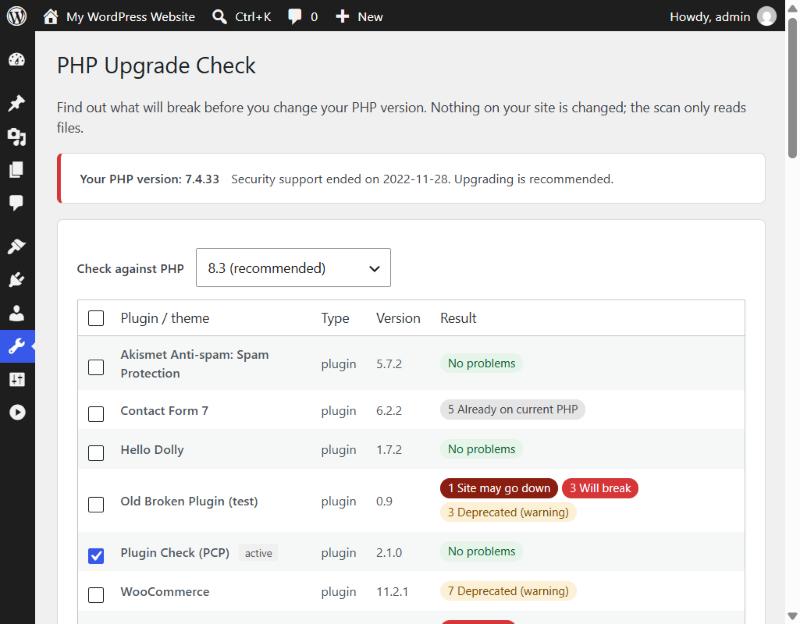
- PHP 8.0 to 8.5, using the current PHPCompatibility rules.
- Works on any host – no
exec()or command-line tools needed. - Shows what the upgrade itself breaks, separate from old problems you already have today.
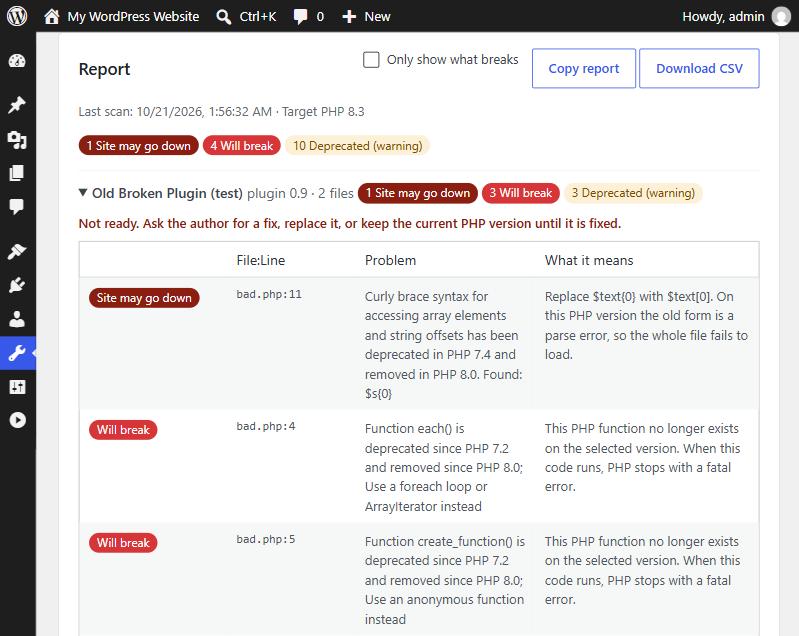
- Sorted by severity: “site may go down”, “will break”, “deprecated”.
- Plain-language fixes: update the plugin, ask the author, or change one line.
- Read-only and safe: nothing on your site is changed; scans in small batches on slow hosts.
- Copy the report as text or download it as CSV for your developer.
Important
This is a static check of the code. It finds most compatibility problems, not all of them. Always test on a staging copy before upgrading a live site.